You replaced every incandescent bulb in the house with LEDs — the efficient, long-life kind — and then you turned the dimmer down for a cozy movie night and got a light show nobody asked for: flickering, strobing, or a low hum that won’t quit. Here’s the thing: your bulbs are probably fine. The problem is that your dimmer switch was designed for a completely different type of bulb, and it’s speaking a language your LEDs don’t understand. A dimmer works by rapidly interrupting electrical current to reduce brightness. Old-school incandescent bulbs (the warm, inefficient kind that ran hot and burned out every year) tolerated that interruption gracefully. LEDs — which use an internal driver, a small electronic circuit, to regulate power — react to the same interruption by flickering, buzzing, or refusing to dim at all. This guide will walk you through exactly what’s happening, how to diagnose your specific situation, and which dimmer to buy so you can fix it once and be done.
| EDITOR'S PICK[Lutron Caseta Original Smart Di…](https://www.amazon.com/dp/B0C7LS14RR?tag=greenflower20-20) | Mid-tier[Leviton Decora Smart Dimmer Swi…](https://www.amazon.com/dp/B000U3I4VE?tag=greenflower20-20) | Budget pick[Lutron Ariadni/Toggler LED+ Dim…](https://www.amazon.com/dp/B006UTQCA2?tag=greenflower20-20) | |
|---|---|---|---|
| Smart / App | ✓ | ✓ | ✗ |
| Works with Matter | — | ✓ | — |
| Neutral Wire Req. | ✗ | ✓ | — |
| Max Wattage (LED) | — | — | 150W |
| Remote Included | ✓ | — | — |
| Price | $91.95 | $29.88 | $19.98 |
| See on Amazon → | See on Amazon → | See on Amazon → |
Why Incandescent Dimmers Fail With LED Bulbs
The standard dimmer switch that’s been on your wall since 1998 is almost certainly a TRIAC dimmer (sometimes called a leading-edge or forward-phase dimmer). TRIAC stands for Triode for Alternating Current — it’s the switching component inside the dimmer that chops up the AC power wave. This technology was perfected for resistive loads: bulbs that work exactly like a toaster element, converting raw electrical energy into heat and light. Incandescent and halogen bulbs are resistive loads. They don’t care how the wave is chopped.
LEDs are not resistive loads. They’re driven by a small switching power supply built into the base of the bulb. That driver wants to see clean, predictable power. When a TRIAC dimmer chops the wave, the LED driver can misinterpret the signal, causing the bulb to flicker at the wrong frequency, drop out entirely below a certain dim level, or emit an audible buzz from the magnetic components inside.
Per the U.S. Department of Energy’s LED Basics documentation, LED drivers are designed to regulate current tightly — which is what makes them efficient — but that same tight regulation makes them sensitive to power quality in ways incandescent bulbs never were.
The three symptoms you’re dealing with, and what they mean:
- Flickering at low dim levels — The dimmer’s minimum load threshold is higher than what your LEDs draw. The dimmer is hunting for a stable operating point and can’t find one.
- Buzzing sound from the fixture or the switch — The LED driver’s switching frequency is interacting with the dimmer’s chopping frequency, creating audible interference.
- Narrow dimming range (e.g., full bright to maybe 50%, then the light drops off) — The dimmer’s minimum dim setting is calibrated for incandescent wattages. Most old-style dimmers require at least 40–60 watts to operate correctly. A four-bulb LED fixture might only draw 24–32 watts total, which falls below that floor.
The Compatibility Matrix: Which Dimmer Works With Which Bulb
Not all LED-compatible dimmers are the same, and not all LED bulbs dim equally well. This is a two-variable problem. Here’s how the variables interact:
Dimmer technology types:
| Dimmer Type | Works With Incandescent | Works With LED | Notes |
|---|---|---|---|
| Standard TRIAC (leading-edge) | ✅ Yes | ⚠️ Often no | Legacy standard; causes most flickering complaints |
| Trailing-edge (ELV) dimmer | ✅ Yes | ✅ Better | Softer waveform cut; more LED-friendly |
| LED-specific / universal dimmer | Limited | ✅ Yes | Designed for low-wattage, capacitive loads |
| Smart dimmer (Lutron Caséta, Leviton Decora Smart) | ✅ | ✅ | Best compatibility; built-in load detection |
Bulb-side variables that matter:
- Dimmable vs. non-dimmable LED — Non-dimmable LEDs will flicker or fail with any dimmer. Check the bulb packaging. If it doesn’t say “dimmable,” assume it isn’t.
- Driver quality — Budget LEDs often use lower-quality drivers with narrower compatibility. Reviewers at Wirecutter’s lighting coverage consistently note that name-brand dimmable LEDs (Philips, GE, Cree) show fewer compatibility issues across a wider range of dimmers than generic alternatives.
- Wattage load — Most dimmers have a minimum load requirement. If your fixture’s total LED wattage falls below that floor, you’ll get instability. The fix is either a different dimmer or adding a resistor load kit (a small resistor that tricks the dimmer into seeing more load — ask for this at an electrical supply house).
By the numbers:
- Most legacy TRIAC dimmers require a minimum load of 40–60W to operate stably
- A four-bulb LED retrofit pulling 8W per bulb = 32W total — below that floor
- Lutron’s LED+ dimmers are rated down to a 5W minimum load, per Lutron’s published LED+ Dimmer Switch product documentation
- Trailing-edge dimmers typically support minimum loads of 10–25W, covering most LED scenarios
How to Diagnose Your Specific Problem
Before buying anything, spend five minutes confirming what you actually have. Pull the dimmer from the wall (turn off the breaker first) and look at the back. Most switches are stamped with their wattage rating and sometimes their technology type. You’re looking for:
- “CFL/LED compatible” or “Incandescent/Halogen only” — The latter is your culprit.
- Maximum wattage rating — A dimmer rated “600W incandescent” may be rated “150W LED” or may have no LED rating at all. Per This Old House’s guide to dimmer switch installation, the derating between incandescent and LED capacity is typically 3:1 to 5:1, so a 600W incandescent dimmer might only safely handle 150W of LED load.
- Brand and model number — Most major manufacturers publish compatibility lists online. Lutron’s website, for example, maintains a searchable database of tested bulb-dimmer combinations. Leviton’s Decora Smart Compatibility Guide offers the same. Before buying a new dimmer, run your bulb’s model number through those tools. This saves returns.
Quick diagnostic test: If your lights are flickering, try replacing one bulb in the fixture with an incandescent or halogen equivalent (even temporarily). If the flickering stops with the incandescent in, the dimmer is the problem. If it flickers even with an incandescent, you may have a wiring issue worth having an electrician inspect.
What to Buy: Dimmer Recommendations by Scenario
Here’s the decision framework, expressed as clearly as possible.
Scenario 1: You want a simple fix, minimal budget (~$15–$30)
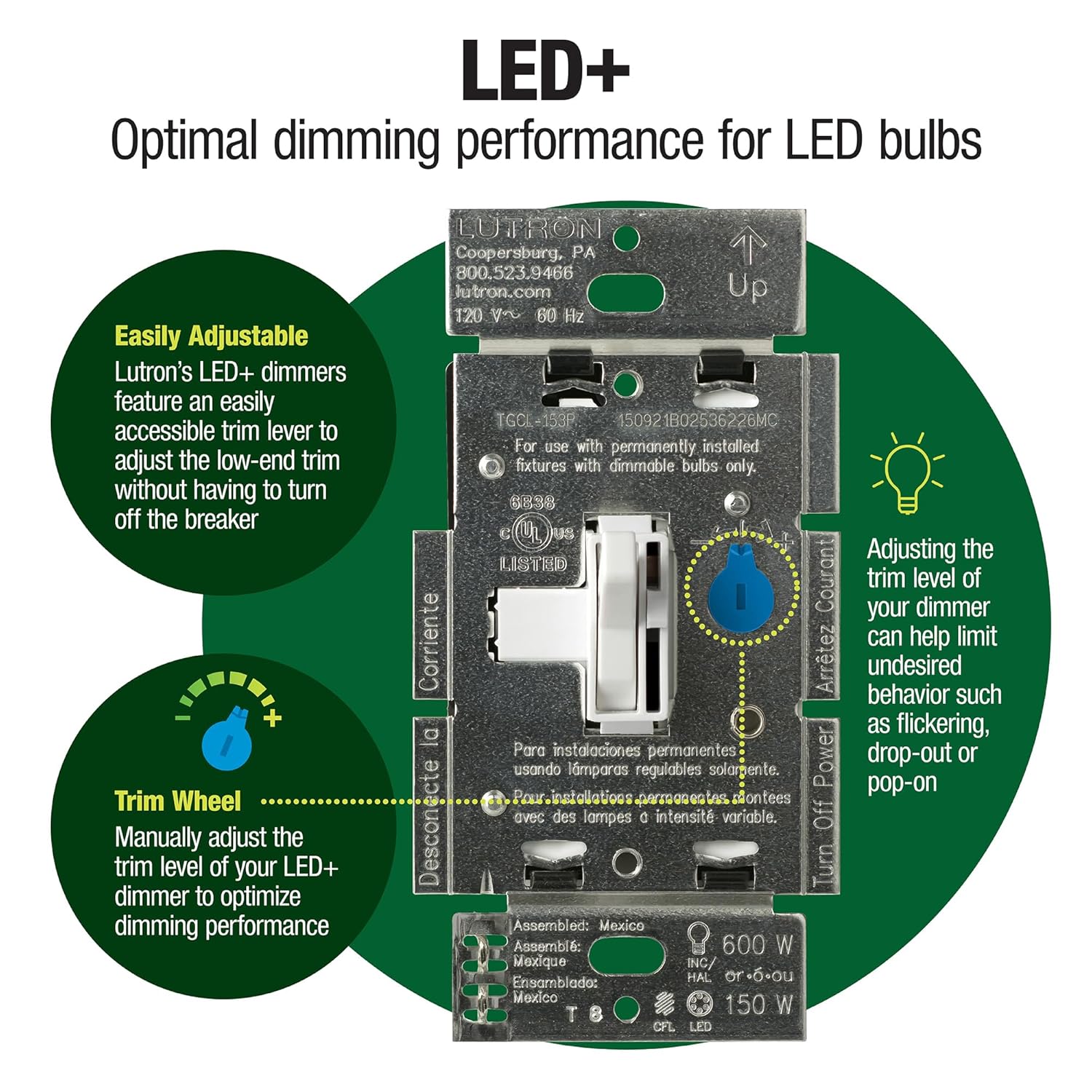
Replace the dimmer with a current-generation LED-compatible dimmer from Lutron or Leviton. Lutron’s Toggler LED+ dimmer (single-pole and 3-way versions available) is a well-regarded option across aggregated reviews — it’s designed specifically for the low-wattage, capacitive nature of LED loads and works without a neutral wire, which matters in older homes where that wire often isn’t present at the switch box. Leviton’s Decora LED+ dimmer occupies the same tier at a similar price point. Both include a trim adjustment screw on the side that lets you set the minimum dim level to match your specific bulbs — this single adjustment resolves most residual flickering after you’ve installed a compatible dimmer.
Scenario 2: You’re running a multi-bulb fixture or a large room (~$30–$60)
Look at Lutron’s Diva LED+ or Leviton’s Decora Smart in a non-wireless configuration. The Diva includes a separate on/off paddle alongside the slide dimmer, which owners consistently report as a usability improvement over slide-only designs. These also handle higher LED wattage loads — up to 150W of LED across a circuit — which covers larger chandelier situations.
Scenario 3: You’re building or expanding a smart home ecosystem (~$60–$120+)
This is where the decision gets more interesting, and where getting the dimmer right matters most for long-term satisfaction. Lutron Caséta wireless dimmers use a separate wireless hub (the Smart Bridge) and communicate on Lutron’s proprietary Clear Connect protocol — not Wi-Fi and not Zigbee. Wirecutter’s coverage of smart dimmers consistently identifies Caséta as the most reliable smart dimmer for compatibility and drop-out resistance precisely because Clear Connect operates on an uncrowded radio band. These dimmers also don’t require a neutral wire, which is a meaningful advantage in pre-2000 construction.
Leviton’s Decora Smart Wi-Fi dimmers skip the hub entirely and connect directly to your router, which some owners prefer for simplicity. The tradeoff, per aggregated reviewer feedback, is slightly more dependence on Wi-Fi network stability and slightly less reliable response timing compared to Caséta’s dedicated protocol.
Philips Hue’s dimmer switches are a different animal — they’re designed to work with Hue smart bulbs specifically and aren’t wired dimmer replacements. If you’re already in the Hue ecosystem and want scene control, they make sense. But they don’t solve the fundamental dimmer compatibility issue for standard LED bulbs; they sidestep it by giving the dimming intelligence to the bulb itself.
If X, then Y — the decision rules:
- If you have a single fixture, a legacy dimmer, and dimmable LED bulbs: Buy a Lutron Toggler LED+ or Leviton Decora LED+, adjust the trim screw, done.
- If your total LED wattage across the circuit is under 25W: Add a resistor load kit from an electrical supply house, or switch to a dimmer rated for 5W minimum (Lutron LED+ line meets this).
- If you’re integrating with Alexa, Google Home, or HomeKit: Lutron Caséta (with Smart Bridge Pro for HomeKit) or Leviton Decora Smart Wi-Fi both work. Caséta edges out on reliability; Leviton wins on simplicity if your Wi-Fi is solid.
- If you’re in a Philips Hue ecosystem: Skip wired dimmers and use Hue-native controls — don’t mix a wired dimmer with Hue bulbs, as the bulbs need full, uninterrupted power to receive wireless commands.
- If the flickering persists after installing a compatible dimmer and adjusting the trim: The bulb driver itself is incompatible. Try a different bulb brand before assuming an electrical problem. Philips and GE dimmable LEDs have the broadest published dimmer compatibility lists in the market.
The One Step Most People Skip
After you install the new dimmer, spend two minutes adjusting the minimum trim setting. Every LED dimmer has one — usually a small flathead screw on the side of the slider, visible when the faceplate is off. Set the slider to its lowest position, then adjust the trim screw until the light holds steady without flickering or dropping out. Then set it one notch higher for a comfortable margin. This calibrates the dimmer’s floor to your specific bulb’s driver characteristics. It takes less time than a return trip to the hardware store, and it’s the step that separates a clean install from a lingering flicker that drives you quietly crazy for years.
The dimmer isn’t the glamorous part of a lighting project. But it’s the part that determines whether everything else performs the way it should. Getting it right is what lets the fixture, the bulb, and the room do their actual job.